A Dynamic Island for macOS, built for one narrow moment
Open source, native, 0.19% average CPU — three rewrites to get there
Context
Running more than one agentic coding tool at once — Claude Code, Codex, OpenCode — while doing something else entirely: writing, reading, in a meeting. There was no way to know which was still working and which had been parked on a permission prompt for five minutes without switching away. iOS solved the analogous problem with the Dynamic Island: an indicator that expands only when it has something to say. macOS has no equivalent, and the notch is empty space.

Constraint
Nothing here could compete for attention with whatever the user is actually doing; an indicator that animates constantly or drains battery defeats its own purpose. The agents don’t share a status format either — JSONL for two of them, SQLite for the third, only Codex declaring its context window — and the notch’s silhouette isn’t exposed by any public API.
The indicator also has about 180 points of width for three things: which agent, what it is doing, how badly it needs you. Three channels don’t fit, so one is reused: while an agent works its color says who it is, and the moment it needs you that color turns amber and says what happened instead.
What I built
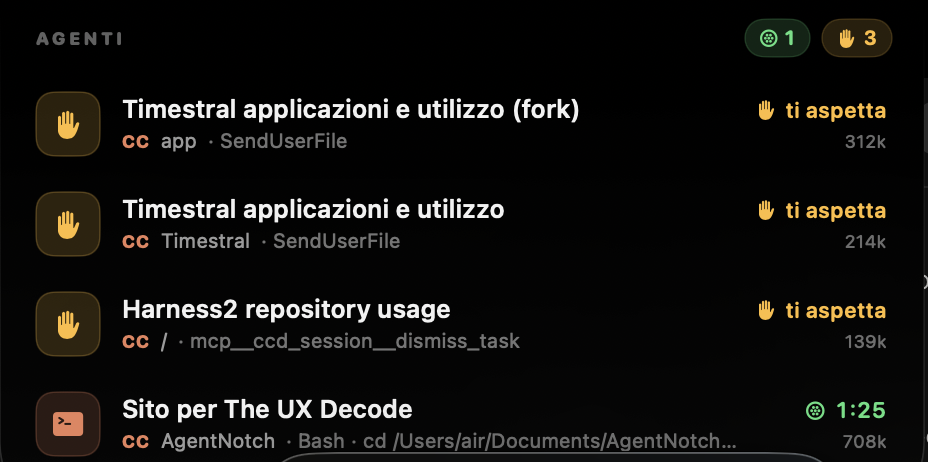
A native menu-bar app — SwiftUI and AppKit, no third-party dependencies, no remote service — that reads the files the agents already write to disk and polls them once a second. At rest it shows nothing. With agents running, a thin line traces the notch’s outline, splitting into one colored arc per agent; hovering expands it into up to four session cards. An agent that needs you turns amber, breathes for twenty seconds, then settles: a signal that never stops moving becomes wallpaper.

The arcs work because the silhouette is an open path — down the left side,
around the bottom, up the right. trim distributes over path length, so a
closing segment along the screen edge, which nobody can see, would spend a third
of the range on nothing. Without it, dividing the outline among n agents is a
span of 1/n.
Every choice was checked against The UX DeCode, the thirteen-principle HCI framework I wrote — and on accessibility it convicts its own implementation: state is carried by color and glyph both, but at rest an agent’s identity is color alone.
How it was built
The four parsers share no Swift protocol. The common interface is a convention —
func poll() -> [AgentSession], written out four times and summed in one
hand-written line — and a grep for protocol across the fourteen source files
returns nothing. A parser can be as strange as its agent’s format demands as
long as it hands back the same struct. The fourth is proof rather than
documentation: 430 lines, grafted in for one enum case and four switch branches.
There are no automated tests: no test target, no Tests folder, no XCTest import. Instead each threshold carries the measurement that produced it beside the number — the permission heuristic is 180 seconds because 35 was wrong by a factor of five, with ordinary builds and test runs sitting at 37 to 122 seconds and every one of them read as a prompt — and six inspection hooks print what the parsers see, or pin the panel in one state.
What happened
Getting under 1% CPU took three attempts and only one left a trace in the code.
.blur() is a Core Animation filter reapplied on every recomposition, holding
about 2% CPU permanently; .drawingGroup() was worse, an offscreen buffer per
arc taking memory from 24 to 107 MB. Neither call appears in the source now, so
those two are provable only as absence. The third is structural: a
repeatForever animation doesn’t cancel by reassigning the property it
animates, so the breathing line is its own view type.
The context bar shipped as a false alarm. Only Codex declares its window on disk, so an assumed ceiling put a red bar on a healthy Claude Code session at 226k tokens against a presumed 200k limit. The fix was removing the denominator rather than raising it: the table of known windows is empty, no window means no gauge, and one line brings it back. Alerting went the same way, from a sound on every turn — about 24 interruptions in a working session, by the note in the code — to four independent gates.
What the numbers don’t say: 0.19% is an average over a five-day uptime, and the
instantaneous reading is 3.2 to 3.7% with agents working. Memory is the claim
that doesn’t survive measurement — that process held 78 MB resident, 52 in
top’s MEM column, against the ~24 MB the README still advertises. Nor can I
claim the twenty-second settle flatly: it depends on a redraw the store doesn’t
publish when one session waits and nothing else changes. MIT, ad-hoc signed,
not distributable.